A Holiday Remembrance Service Where Every Family Sees Their Loved One
A holiday remembrance service works when every family in the room sees their own person honoured. The simplest way to do that is a memorial wall: invite each family to scan a QR code and add one photo and a few words before the evening, show the wall slowly on the chapel screen between the readings and the candle lighting, and let families add more from their seats. Staff approve each post before it appears. Send the invitation three to four weeks ahead; the wall itself takes a minute to set up.
Last updated: October 2026
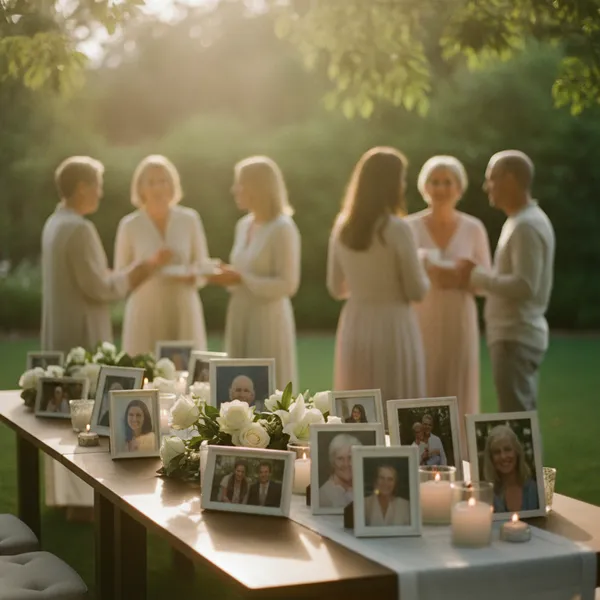
A holiday remembrance service is an evening a funeral home, hospice or church holds in late November or December for the families it has served that year — usually readings, music, the reading of names and a candle lighting. Many homes add a tribute: a slideshow of the people being remembered. A memorial photo wall is a tribute the families build themselves: each family scans a QR code, adds a photo and a line about their person from a phone, and the post appears on the chapel screen.
Why the hand-built tribute video is the hard part
The tribute is the part families remember, and the part staff dread. The usual way is a letter asking families to email a photo, then an evening of someone in the office chasing the families who did not reply, resizing what came in, and building a video the week of the service. Late photos miss it. A family whose photo did not arrive sits through everyone else's.
A wall moves that work to the families, one photo at a time. Each family adds their own, when they are ready, from the phone they already use — no account, no app, no email attachment. A family that forgets can add one from their seat when they arrive, and it appears on the screen during the evening.
Families add words, not only photos. A video carries a name and a picture. A wall carries the line a family chose to write next to it — a nickname, a favourite saying, "Dad, 1941–2026, still burning the toast". That is what other families in the room read.
It is a reason to write to families that is not a sales letter. An invitation to add a photo to an evening held in their person's honour is aftercare: a kind contact in the hardest month of the first year.
Planning timeline
- Six weeks out. Fix the date and the room. Check the chapel screen: any TV or projector with a web browser works, or a laptop plugged in by HDMI. Create the wall, choose the Memorial theme (Premium and Professional) and turn on the approval queue (Professional).
- Four weeks out. Send the invitation by letter and by email to every family served this year, with the QR code and a short link printed on it. A card insert works well in a letter; the memorial QR sign template prints one.
- Two weeks out. Look at the wall. Note the families who have not added a photo yet; a staff member who knew the family can call and offer to add one for them from a photo the home already has, with the family's permission.
- The week of. Rehearse on the chapel screen: open the display link, check the slow speed, and post a test from a phone and remove it. Print the QR code on the order of service.
- On the night. One staff member holds the phone that approves posts and runs the wall. The QR code stays in the corner of the screen so families can add from their seats.
Inviting families to add a photo
Keep it short, optional and specific: who it is for, what to send, by when, and that the evening is theirs whether they add anything or not. A sample:
Each December we hold an evening of remembrance for the families we have served this year. This year it is on [day, date] at [time] in our chapel, and you and your family are welcome.
During the evening, photographs of the people we are remembering will be shown on the chapel screen. If you would like your loved one to be included, scan the code below with your phone camera, or visit [short link], and add one photo and a few words about them. There is nothing to download and no account to make. Our staff see each photo before it is shown.
Please add yours by [date] if you can — you can also add one on the night.
Ask families to write the person's name in the message. On a wall of forty photographs, the name is what lets another family say it aloud.
Order of service with the memorial wall
- Arrival (15–20 minutes). The wall is already playing in the Slideshow view at its slow speed, with quiet music. Families find their person on the screen; those who did not add a photo can do it now.
- Welcome and readings. Pause the wall from the phone if the screen distracts from the speaker, or let it run.
- The tribute. Five to ten minutes of the wall with music and nothing else, at the slowest speed. Pick music long enough for the stream to pass every family's photo at least once.
- Reading of names and candle lighting. Many homes pause the wall here so the room's attention is on the candles.
- Closing and reception. Switch to the Grid view so families can see many photos at once while they talk.
Keeping it dignified: approval and display settings
- Approval before anything shows (Professional). With the approval queue on, every post waits until a staff member taps yes, from a phone or laptop. AI moderation screens text and photos first. Nothing reaches the chapel screen unseen.
- Messages and photos only. On paid plans you choose what guests can post: turn off emoji reactions so the screen carries photos and words, nothing else.
- Slow speed. The Slideshow view has three speeds; use the slowest for a service. You can change it, pause, and switch views from the phone remote without walking to the screen.
- The Memorial theme (Premium and Professional) sets a quiet look meant for services: soft stone colours, white cards and a serif heading.
- Your home's branding (Professional). Your logo inside the QR code and on the page families see when they scan, your own background on the wall, and no QR Wall marks. To families, it is your service.
Set up the wall for the service
About ten minutes, once. The Professional plan ($19.99/month) covers every service the home runs, not only this one.
-
1
Create the wall
Name it for the evening ("Holiday Remembrance 2026"), choose the Memorial theme, and set the wall's language — English, Spanish or Bahasa Indonesia.
-
2
Turn on approval and choose what families can post
Turn on the approval queue so staff see each post first, and turn off emoji reactions so the screen carries photos and messages only.
-
3
Add your branding
Upload your logo (it goes inside the QR code and onto the page families see) and a background for the wall.
-
4
Print the invitation
Download the QR code for the letter insert and the order of service, and print the short link underneath for anyone whose camera will not read it.
-
5
Rehearse on the chapel screen
Open the display link on the screen, set the slowest Slideshow speed, post a test from your phone, approve it, then remove it.
-
6
Afterwards, send families the gallery
Share the private gallery link with every family who took part, and download everything as one ZIP for the home's records.
What goes wrong
- ✗Inviting too late. Families need weeks, not days, in December. Send it four weeks out and remind them once.
- ✗No name with the photo. Ask for it in the invitation; on the night, a photo without a name is a stranger.
- ✗Showing posts unseen. In a room of grieving families, one wrong photo is the evening. Use the approval queue, and give one person the job of approving.
- ✗The family that is missing. Two weeks out, check who has not posted and offer to add a photo for them.
- ✗A screen nobody tested. Hotel and chapel TVs go to sleep, change input, or block sites. Rehearse on the actual screen the week before.
- ✗Running it too fast. The default speed suits a party. Set the slowest for a service.
A memorial wall, a tribute video and a photo table, compared
Each one has its place, and many homes use two. QR Wall's prices are our own.
Frequently asked questions
What happens at a holiday remembrance service?
A funeral home, hospice or church invites the families it has served that year to an evening in late November or December. It usually includes a welcome, readings and music, the reading of names, a candle lighting and a tribute — often a slideshow of the people being remembered — followed by time for families to talk.
How do funeral homes collect photos for a memorial tribute?
Traditionally by asking families to email a photo, then building a video. A memorial photo wall lets each family add their own: they scan a QR code on the invitation or the order of service, add a photo and a few words from their phone with no app or account, and the post appears on the chapel screen once staff approve it.
Can families add photos if they can't attend?
Yes. The invitation's QR code and short link work from anywhere, so a family who cannot come can still have their person included. Afterwards the home can send every family the gallery link.
Can staff review photos before they appear?
Yes, on Professional ($19.99/month). With the approval queue on, nothing reaches the screen until a staff member approves it with one tap, and AI moderation screens text and photos first.
Can the wall carry our funeral home's branding?
Yes, on Professional: your logo inside the QR code and on the page families see after scanning, your own background on the wall, and no QR Wall marks.
How long should the tribute part of the service be?
Five to ten minutes is common, with the wall at its slowest speed and music long enough for every family's photo to pass at least once. Let the wall keep playing during arrival and the reception, so families have time to find their person.
What does it cost?
A wall is free to try. Premium ($10.99/month) adds the Memorial theme, every post on screen and the download. Professional ($19.99/month) adds the approval queue, AI moderation and your branding, and covers every service the home runs that month — remembrance evenings and individual funerals alike.
Every family's person, on the screen
Set up the wall in a minute and send the invitation this week. Free to try; Professional covers every service.
Create your free QR Wall →✓ No credit card required ✓ Setup in 60 seconds
Related resources
QR Wall for funeral homes
One plan for every service, with your home's branding
A memory wall for a celebration of life
The wall on the screen, and the gallery the family keeps
How to collect photos for a funeral
Five ways to gather everyone's photographs
How many photos for a funeral slideshow?
Photos, seconds, songs and minutes
Memorial photo slideshow tools, 2026
The options compared
QR Wall vs Our Tributes
A live wall beside an online memorial