For Christmas parties
Snow on the screen. Everyone's photos under it.
Guests scan a code on the TV and post photos and messages; each lands on the screen in about a second. The Christmas theme fills the wall with snow falling at three depths, string lights blinking along the top, and a sleigh that crosses the sky every half minute.
Free to start. Try the Christmas theme on your own wall for 10 seconds, no card.
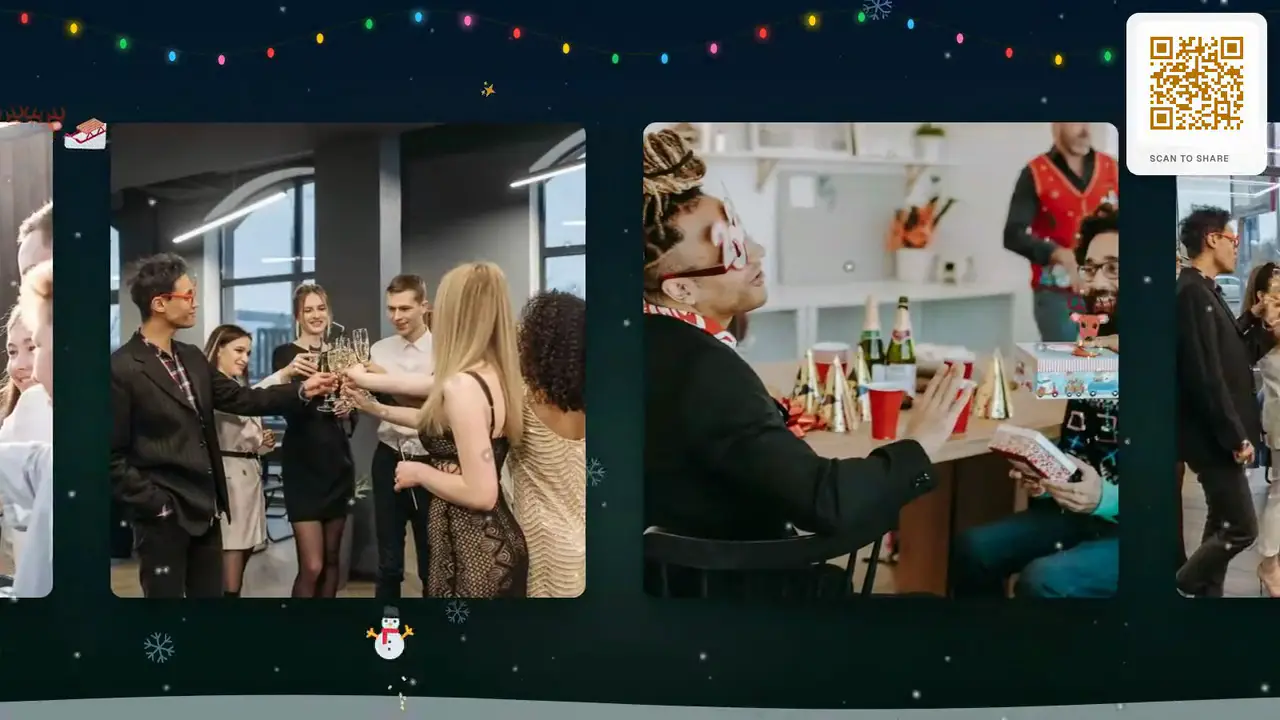
- The TV becomes a decoration
- Snow, string lights and a sleigh, animated behind and in front of the photos all night — no fireplace video required.
- Every Secret Santa reveal, on one screen
- The ugly-sweater lineup, the gift swap, the kids by the tree: everyone posts to the same wall, so the room sees it together.
- No app, at home or at the office
- Guests scan with their phone camera and it opens in the browser. For a work party, Professional holds every post for your approval.
A Christmas party photo wall is a live screen — a TV or projector — that guests post photos and messages to by scanning a QR code with their phone. On QR Wall it takes under a minute to set up, needs no app, and each photo appears on the screen about a second after it is posted.
The Christmas theme turns the screen into a winter night: soft snow falling at three depths, with the nearest flakes drifting across the guests' photos, a string of coloured lights blinking along the top, glowing bokeh, and a reindeer sleigh that crosses the sky with a gold trail every 20 to 35 seconds. Guests' reactions rise with a trail of sparkles. It works for a family Christmas, a Christmas house party and an office Christmas party.
Ready before the first carol
Two minutes before guests arrive. On the night, they only scan.
-
STEP 1
Open your wall on the TV
Create a wall ("Christmas at the Nguyens’"), open the display link on the TV or projector and pick the Christmas theme in Customize. The QR code is on the wall itself.
-
STEP 2
Guests scan and post
Ugly sweaters, the gift exchange, the kids in pyjamas, a toast — on the screen in a second, with snow falling across it.
-
STEP 3
Keep every photo
On Boxing Day, download everything or send one gallery link to the whole family.
What the Christmas theme does
A winter scene built to run all night on any TV, without getting in the way of anyone's face.
Snow at three depths
Far flakes fall slowly behind the photos, near ones drift across them, all pushed by the same gentle wind — so the snow has depth instead of looking like a screensaver.
String lights along the top
A sagging wire of coloured bulbs that glow and fade in a slow chase, like the lights over the doorway.
A sleigh every half minute
A reindeer sleigh crosses the sky trailing gold sparks — the moment the kids point at the screen.
Reactions with a sparkle trail PRO
Each reaction a guest taps rises up the wall leaving sparkles. On Professional the buttons become 🎄 🎅 ❄️ 🎁 ⛄ 🦌 ✨ ❤️.
Safe for the office party PRO
The approval queue holds every post until you tap yes, and AI moderation screens text and images first. Remote staff post from home to the same screen.
Any screen with a browser
A smart TV, a projector, a laptop on the sideboard. On a smart TV, open qrwall.live/tv and pair it from your phone.
Forty phones, one screen
At every Christmas party, forty people take photos on forty phones, and almost none of them are seen by anyone else. The wall puts them on the one screen everybody is already near, with snow falling across them — and the next morning, they are all in one place instead of scattered across group chats.
It is also how the people who couldn't come get to be there. The wall is a link: the cousin abroad, the colleague working the holiday shift, the grandparents who stayed home post a photo, and it appears on the TV in the middle of the party.
The same wall, in Grid
Every photo at once, with snow falling between them.
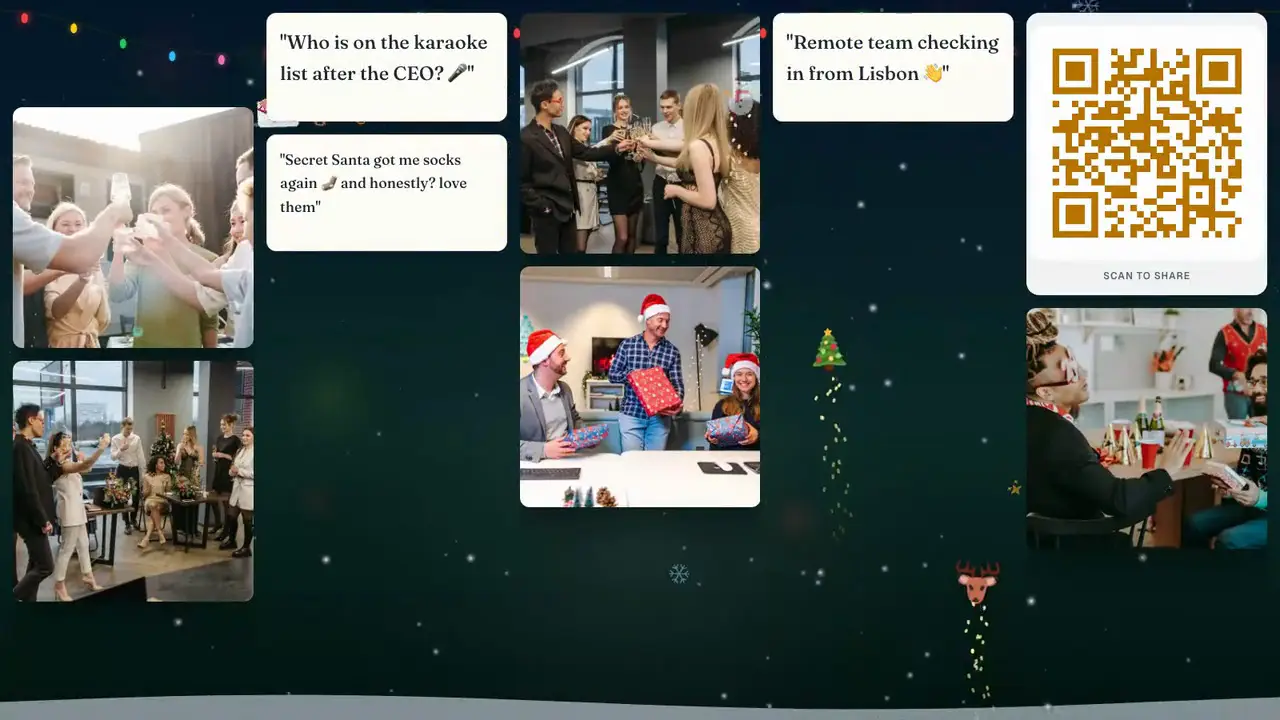
Grid fills the screen with every recent post — good for the mingling part of the night. Slideshow gives each photo its moment — good for the gift exchange. Switch from your phone; nobody rescans.
Christmas theme · Premium keeps it on all night
Live wall, photo booth, shared album or group chat
Where Christmas party photos usually end up.
| QR Wall (Christmas theme) | Photo booth rental | Shared album | Group chat | |
|---|---|---|---|---|
| Everyone sees it together | Yes — live on the TV | Prints only | No — each phone, later | No — each phone |
| Animated Christmas look | Yes — snow, lights, sleigh | Props and backdrop | No | No |
| People far away take part | Yes — same screen | No | Afterwards | Yes, in the thread |
| Setup | Under a minute, any TV | Vendor, delivery, floor space | Invite links | Already there |
| Cost | Free to try; $10.99/mo keeps the theme on | $300–$800 per night | Free | Free |
Pricing for one Christmas party
Try the theme free for 10 seconds on your own wall. One month of Premium covers the season — cancel after.
Free
Try it on your own TV
$0
- A live wall with a QR code
- Five posts on screen at a time, rotating
- Preview any seasonal theme for 10 seconds
- Christmas theme all night
- Download everything afterwards
Premium
The pick for a Christmas party
$10.99 / month
- Christmas theme on all night
- Unlimited posts on the screen
- Download every photo the next day
- Shareable gallery link
- Remove QR Wall branding
Professional
Office Christmas parties
$19.99 / month
- Everything in Premium
- Christmas reaction buttons (🎄 🎅 ❄️ …)
- Approval queue: nothing shows until you tap yes
- AI moderation on text and photos
- Your logo inside the QR code
Christmas photo wall questions
What hosts ask before putting a live screen up at a Christmas party.
- How do I set up a Christmas photo wall?
- Create a wall at qrwall.live, open the display link on your TV or projector, and choose the Christmas theme under Customize. Guests scan the QR code on the screen with their phone camera and their photos appear live with snow and lights animated around them. Setup takes under a minute and needs no app.
- What does the Christmas theme look like?
- A winter night: snow falling at three depths (the nearest flakes drift across the photos), a string of coloured lights glowing along the top, soft coloured bokeh, a snowbank along the bottom, and a reindeer sleigh that crosses the sky with a gold trail every 20 to 35 seconds. Reactions rise with a sparkle trail.
- Is the Christmas theme free?
- Any free wall can preview it for 10 seconds. Premium ($10.99/month) keeps it on for the whole party — and for every wall you run that month, so the office party and the family one are both covered.
- Can I use it at an office Christmas party?
- Yes. Professional adds an approval queue so nothing reaches the screen until you approve it, and AI moderation of text and images. For a company party with a neutral look, see our holiday party page.
- Will it run on a smart TV?
- Yes. Open qrwall.live/tv on the TV's browser and pair it by scanning a code with your phone. The animation is light enough for a Chromecast or a Fire TV stick, and it pauses when the screen is hidden.
Let it snow on the TV.
Set it up before guests arrive. Watch the photos fall in all night. Keep every one the next morning.
Free to start. No card, no commitment.
Last updated: October 2026