Free printable · your logo and brand color · Letter and A4
Company event QR code sign template
A company event QR code sign tells attendees how to get their photos and messages onto the main screen: the event name, a headline, three numbered steps and the QR code. Add your logo and brand color below, paste your wall link, and print on Letter or A4 for registration, the coffee station and the breakout rooms. It is free, needs no account, and the code opens straight to your wall.
Open this page in any browser to fill in and print the template: sizes US Letter, A4. Free, no account, nothing to install.
A company event QR code sign is a branded printed sign whose code opens the event's photo and message wall. At a kickoff, offsite, holiday party or conference, the main screen shows the code while posts appear beside it; the printed signs carry the same code to places the screen can't reach, such as registration, the lobby, the lunch line and the breakout rooms.
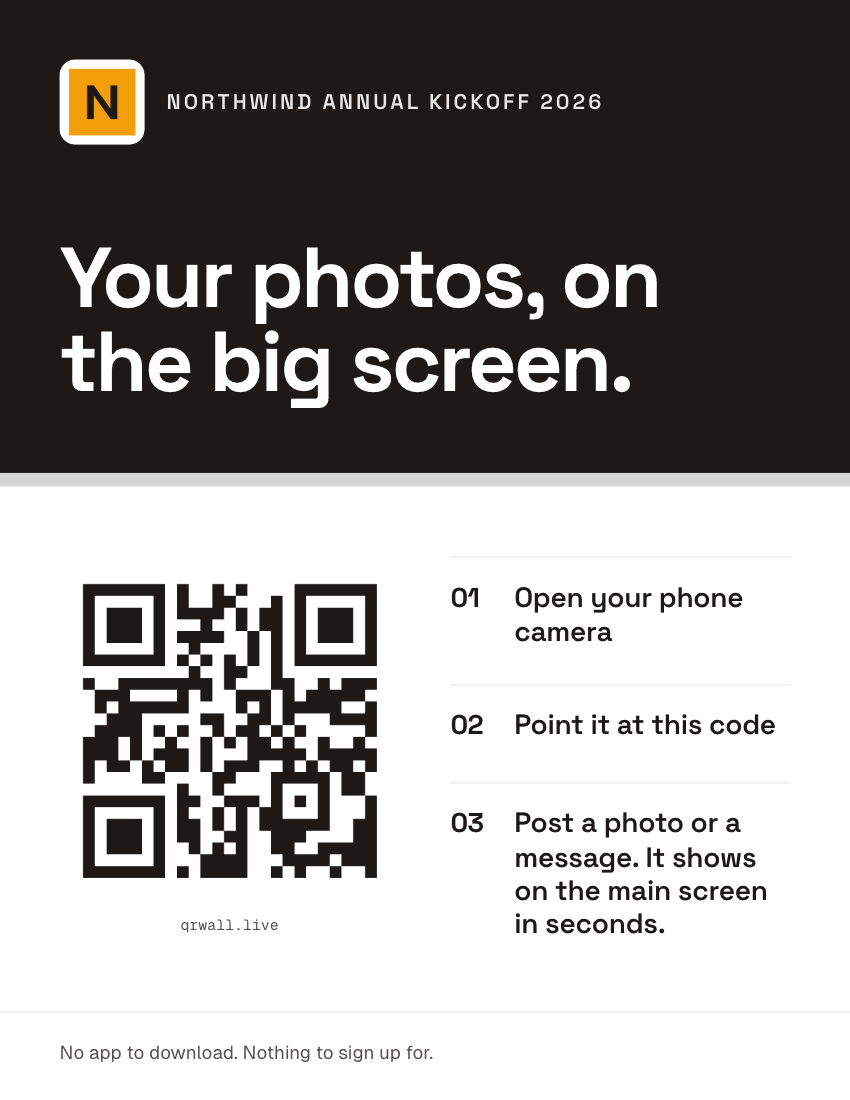
What’s on this template
- A header in your brand color, with your logo and the event name
- A large headline that says what the wall is for
- The QR code on white, with your wall's short link beneath
- Three numbered steps: open the camera, point it at the code, post
- A footer line for the promise that matters at work: no app, no account
What to write on a company event QR sign
At work, people want to know what happens to what they post before they post it. Say where it goes, and say it's quick:
- “Your photos, on the big screen.”
- The default headline. Says where posts go.
- “Ask the panel anything”
- For a Q&A or town hall wall. Pair it with approval before display.
- “Shout out a teammate”
- Recognition walls at kickoffs and holiday parties.
- “Share your best shot from today”
- Offsites and team days, where photos are the point.
- “Posts are reviewed before they appear”
- Only if you turned on approval (Professional). Staff post more when they know.
Where to put company event QR signs
The main screen is the sign that matters: the code sits next to the posts, and people scan when they see a colleague's post appear. Printed signs catch everyone who isn't facing it yet:
- Registration and badge pickup
- Everyone passes it, and they're waiting in line.
- Coffee and lunch stations
- Hands free, phones out, a few minutes to fill.
- Breakout rooms
- Rooms without the main screen can still post to it.
- Stage-side easel
- Visible in photos of the speakers, next to the screen.
- The event app or agenda page
- Print or paste the same short link.
How to make a company event QR sign
Three steps, a couple of minutes, entirely in your browser.
STEP 1
Get your wall link
Create a free QR Wall for the event, or open the one you have, and copy its guest link. Signed in, pick the wall from the list instead.
STEP 2
Brand the sign
Type the event name and headline, upload your logo (it goes in the header and in the center of the code), and pick your brand color.
STEP 3
Print
Print on US Letter or A4, or choose Save as PDF in the print dialog to hand the file to your print vendor or events team.
Questions hosts ask
Before printing, mostly.
- Can I put our company logo on the QR code sign?
- Yes, free. Upload a PNG, JPG or SVG: it appears in the sign's header and in the center of the QR code, on a white chip with the code's error correction raised to level H so it still scans. A square logomark works better than a wide wordmark.
- Can I match our brand colors?
- Yes. Pick a preset or enter any color; the header takes the color and the text switches between white and dark automatically so it stays readable. The QR code itself always prints dark on white, because a colored code scans less reliably.
- How do we stop inappropriate posts at a work event?
- On Professional, AI moderation screens text and photos before they reach the screen, and the approval queue holds every post until someone on your team taps approve on their phone. If you use approval, say so on the sign: "Posts are reviewed before they appear".
- How big should the sign be?
- Letter or A4 prints the code about 9 cm wide, which reads from 3 to 4 metres. For a lobby banner or a stage-side easel scanned from further away, download the code as an SVG and have it printed larger: allow 2 cm of code per metre of distance.
The sign points to the screen.
QR Wall puts what guests post on a TV or projector in about a second, with the code beside it. Signs carry that code to the rest of the room. Free to start, no app for guests.
Live walls for corporate events — Kickoffs, offsites, holiday parties and town halls: moderation, approval and branding.
Create a free wallNo credit card · set up in about a minute
Last updated: September 2026