Free printable · Letter, A4 and 5×7 table cards
Wedding QR code sign template
A wedding QR code sign tells guests where to share their photos: your names, one line such as "Scan to add your photos to our wall", the QR code, and a short link underneath. Type your names and date below, paste your photo wall link, and print it on Letter or A4 for the entrance or as 5×7 cards for the tables. It is free, needs no account, and the code opens straight to your wall.
Open this page in any browser to fill in and print the template: sizes US Letter, A4, 5×7 in card, Two 5×7 cards per sheet. Free, no account, nothing to install.
A wedding QR code sign is a printed card or poster with a QR code that opens the couple's photo sharing page. Guests point their phone camera at it, and the photos they post go to one place instead of a dozen group chats. With a live photo wall, the same code is shown on the reception screen, and the printed signs carry it to the tables, the bar and the guest book, where guests have their phones out and a minute to spare.
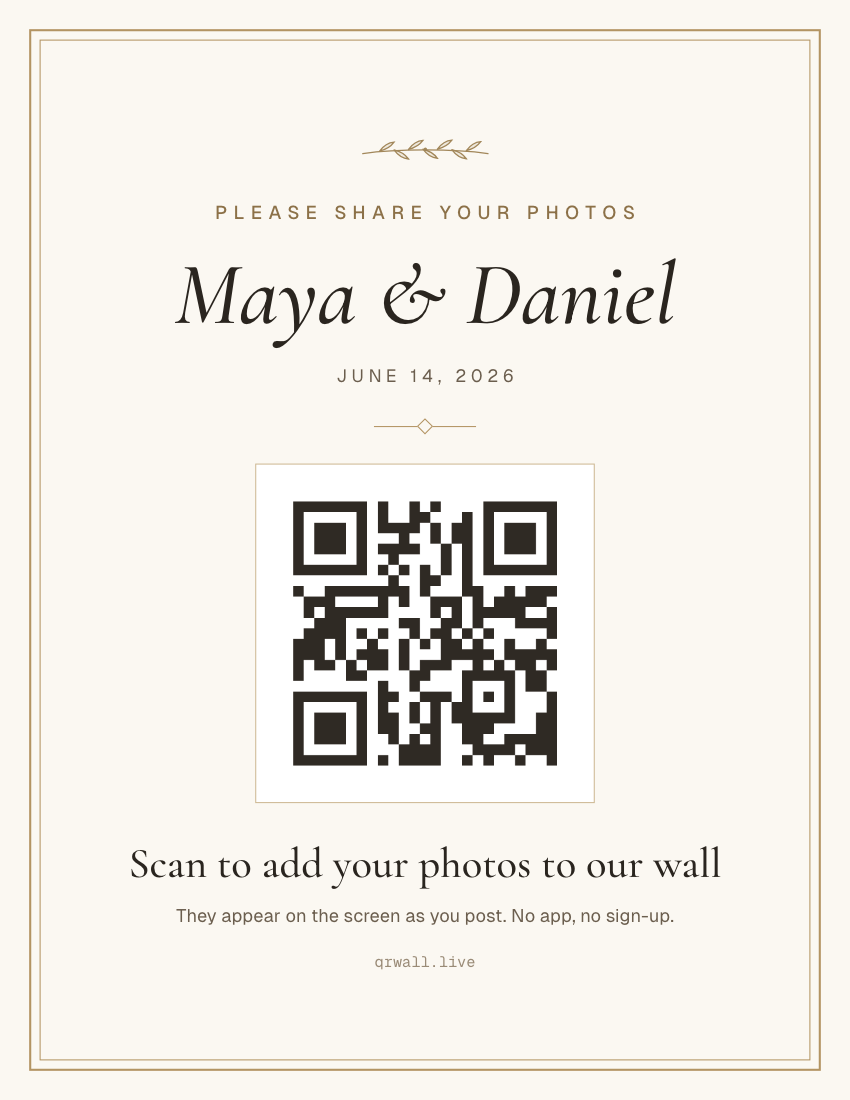
What’s on this template
- A top line in spaced capitals ("Please share your photos")
- Your names in a large italic serif, with the date or venue beneath
- The QR code in a thin gold frame, sized to scan from across a table
- One instruction line and a small-print promise: no app, no sign-up
- Your wall's short link, for anyone whose camera won't read the code
What to write on a wedding QR sign
Say what scanning does, and promise it's easy. The two things that stop a guest from scanning are not knowing what happens next and suspecting an app download. These lines answer both:
- “Scan to add your photos to our wall”
- The default. Says what happens and where the photo goes.
- “Share the love — scan to post your photos”
- Warmer, for the tables at the reception.
- “Help us see the day through your eyes”
- A top line for the entrance sign, above the names.
- “Leave us a message for the guest book”
- When the wall doubles as a digital guest book.
- “No app, no sign-up. Just your camera.”
- The small print. Keep it on every card.
Where to put wedding QR signs
The code lives on the reception screen, where every photo lands the moment it's posted and makes the next guest want to join. Printed signs are extras that carry the same code to where guests pause:
- Every table (5×7 cards)
- Seated guests have their phones out and time to spare. One card per table does more than one big sign at the door.
- Beside the guest book or card box
- Guests already stop there to leave a message.
- The bar
- The queue is the longest wait of the night.
- The entrance (Letter or A4)
- Tells people the wall exists before they reach the screen.
- The back of the programme
- Print the same code small; it travels with every guest.
How to make a wedding QR sign
Three steps, a couple of minutes, entirely in your browser.
STEP 1
Get your wall link
Create a free QR Wall photo wall for the wedding, or open the one you have, and copy its guest link. Signed in, pick the wall from the list instead.
STEP 2
Fill in the sign
Type your names, the date and the instruction line. The preview updates as you type; add a logo or monogram to the center of the code if you like.
STEP 3
Choose a size and print
Print on US Letter or A4 for the entrance, or as 5×7 cards (one per page, or two per Letter/A4 sheet) for the tables. Choose Save as PDF in the print dialog to send it to a print shop.
Questions hosts ask
Before printing, mostly.
- What should a wedding QR code sign say?
- Three things: what scanning does ("Scan to add your photos to our wall"), who it's for (your names), and that it's easy ("No app, no sign-up"). Keep the short link under the code for anyone whose camera won't read it. Longer poems and hashtags get skimmed; one clear line gets scanned.
- What size should a wedding QR sign be?
- Use 5×7 in cards on the tables and a Letter or A4 sign at the entrance. The rule of thumb is 2 cm of code per metre of scanning distance: on a 5×7 card the code prints about 5 cm wide, comfortable from a seat; on Letter or A4 it prints about 9 cm, readable from a few steps away.
- Do guests need an app to scan the code?
- No. Every iPhone and Android phone from the last several years reads QR codes with the built-in camera. The code opens your wall's posting page in the browser, and guests post from there without an account.
- Should the QR code be on the screen or on the tables?
- Both, with the screen first. The wall shows its own code while photos appear next to it, and seeing a friend's photo land is what gets the next guest to scan. Table cards carry the same code to people who aren't looking at the screen.
- Can I print the sign at a print shop?
- Yes. Choose Save as PDF in the print dialog and send the file; it is set to the exact page size (Letter, A4 or 5×7) with no margins. Ask for heavy matte card stock: gloss reflects venue lights and makes the code harder to scan.
The sign points to the screen.
QR Wall puts what guests post on a TV or projector in about a second, with the code beside it. Signs carry that code to the rest of the room. Free to start, no app for guests.
Live photo walls for weddings — How the wall works at a reception, from the first dance to the gallery the next day.
Create a free wallNo credit card · set up in about a minute
Last updated: September 2026