Free printable · school colors · Letter and A4
Graduation party QR code sign template
A graduation party QR code sign invites guests to share photos and messages for the graduate: the class year set large, the graduate's name, one line such as "Share your photos with Jordan", and the QR code. Pick your school colors below, paste your photo wall link, and print on Letter or A4 for the entrance, the food table and the photo corner. It is free, needs no account, and the code opens straight to your wall.
Open this page in any browser to fill in and print the template: sizes US Letter, A4. Free, no account, nothing to install.
A graduation party QR code sign is a printed sign in the school's colors whose code opens a shared photo and message wall for the graduate. Guests scan it with their phone camera and post without an app; with a live wall, the photos appear on the TV at the party and stay together in one place afterwards.
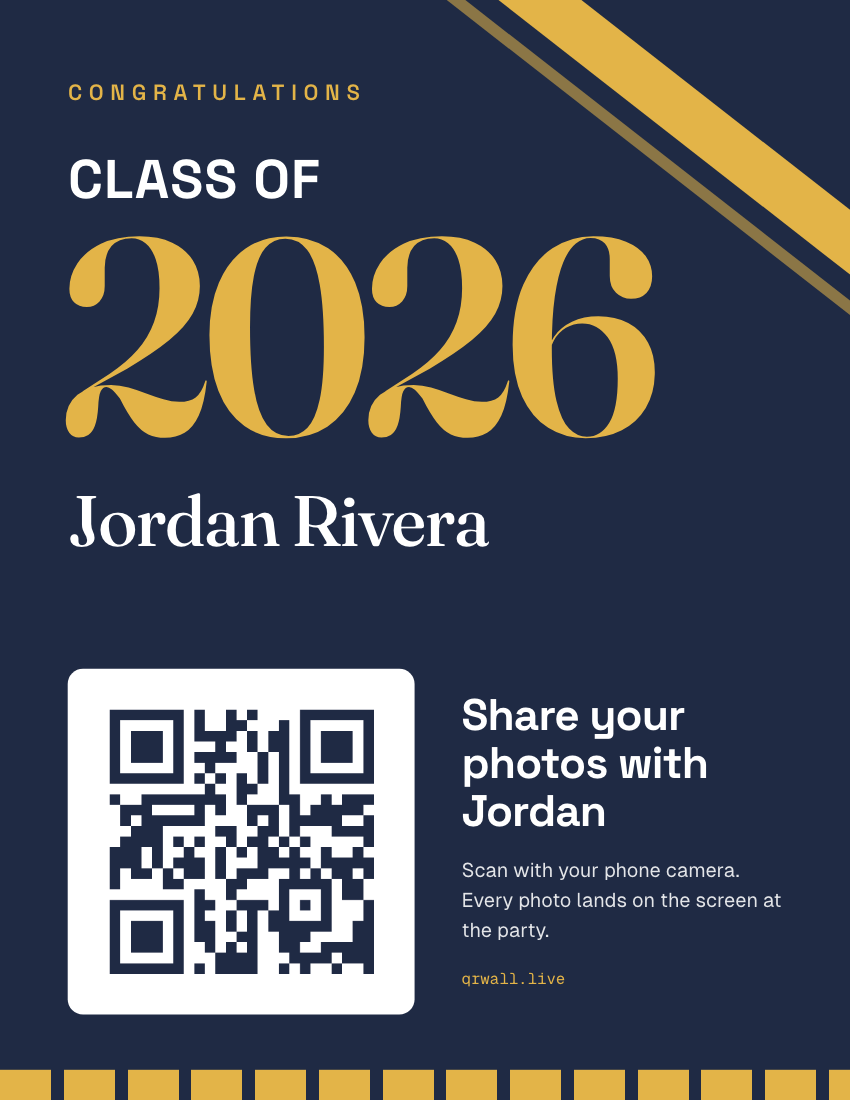
What’s on this template
- "Class of" and the year set huge, in your school's second color
- The graduate's name under the year
- The QR code on a white card, so it scans on any background color
- One line saying who the photos are for, and a small-print promise
- A pennant stripe and your wall's short link along the bottom
What to write on a graduation party QR sign
Name the graduate and ask for something specific. "Share your photos" works; "share your photos with Jordan" works better, because it's a favor for a person, not a task:
- “Share your photos with Jordan”
- The default. Personal, and says what to do.
- “Leave Jordan a message for the next chapter”
- Turns the wall into a card everyone signs.
- “Post your favorite photo of Jordan”
- Brings out the old photos parents and grandparents have.
- “Best advice for the graduate?”
- A prompt that gets messages, not only photos.
- “No app needed. Just point your camera.”
- The small print. Grandparents read it first.
Where to put graduation party QR signs
Put the wall on the TV and let the code show on it; people scan when they see a photo of the graduate come up. The printed signs are extras for where guests gather:
- The entrance or gift table
- Every guest stops to drop off a card.
- The food table
- The longest pause of the party.
- The photo corner or memory board
- Guests are already holding up phones.
- Next to the TV
- A second copy of the code at eye level beside the screen.
- The invitation
- Print the same code small so guests can post throwback photos before the day.
How to make a graduation party QR sign
Three steps, a couple of minutes, entirely in your browser.
STEP 1
Get your wall link
Create a free QR Wall for the party, or open the one you have, and copy its guest link. Signed in, pick the wall from the list instead.
STEP 2
Set the colors and names
Pick your school colors (or enter any two), then type the class year, the graduate's name and the instruction line.
STEP 3
Print
Print on US Letter or A4. For a sturdier sign, print on card stock and prop it in a frame, or choose Save as PDF and take it to a print shop.
Questions hosts ask
Before printing, mostly.
- What should a graduation party QR sign say?
- The graduate's name, the class year and one line that says what to do, such as "Share your photos with Jordan". Add "No app needed" in small print. Naming the graduate gets more posts than a generic "scan here", because guests are doing something for a person.
- Can I use our school colors?
- Yes. Choose a preset pair or enter any two colors: the first fills the sign, the second sets the class year and the pennant stripe. The QR code always prints on a white card, so it scans whatever colors you choose.
- Can guests post before the party?
- Yes. The wall is live from the moment you create it, so you can put the same code on the invitation and let family post throwback photos in the days before. They'll be on the screen when guests arrive.
- How do we show the photos at the party?
- Open the wall on any TV with a browser, a laptop connected to the TV, or a projector. The wall shows its own QR code in the corner while the photos play, so the TV works as the biggest sign in the room.
The sign points to the screen.
QR Wall puts what guests post on a TV or projector in about a second, with the code beside it. Signs carry that code to the rest of the room. Free to start, no app for guests.
Live photo walls for graduations — Parties, ceremonies and senior nights: the wall on the TV, the photos kept after.
Create a free wallNo credit card · set up in about a minute
Last updated: September 2026